Release notes
This page contains release notes that apply to all APIs.
2023r11
Activate individual business APIs
Previously, when the Business API module was activated, all business APIs were available to use, even the ones that were not needed.
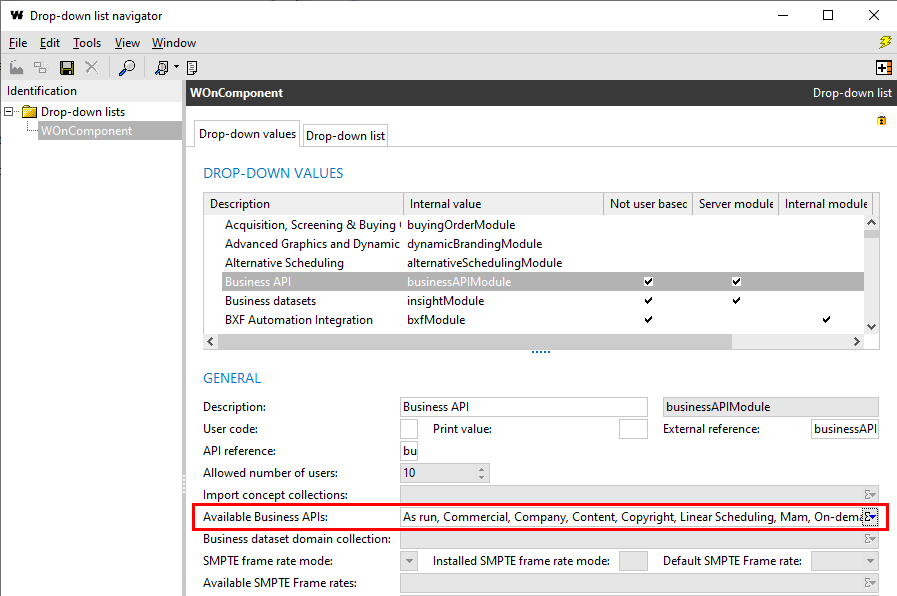
From this version, the Available Business APIs field has been added to the WOnComponent drop-down list.
It can only be edited in configuration mode when the Business API value is selected. Only the needed APIs should be added here. Contact MEDIAGENIX to do this for you.
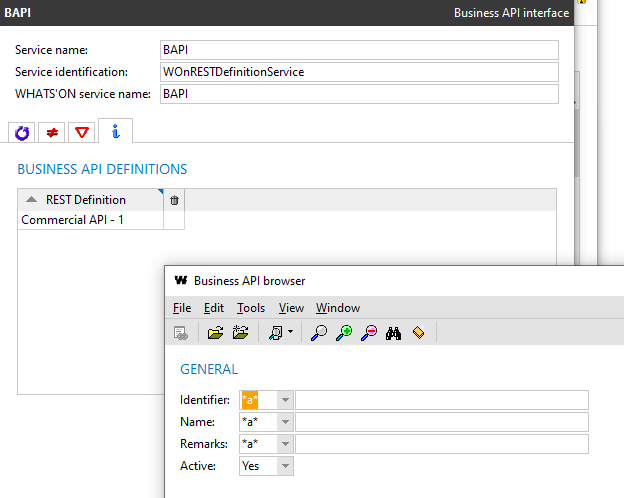
When adding business APIs to the business API interface service, the Active criterion on the browser is now set to Yes to filter out the BAPIs not part of the Available Business APIs field. The inactive APIs are indicated in the result list with a trash can icon.
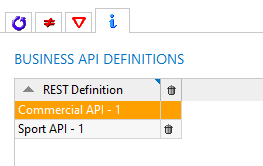
If any APIs were already part of the service, and then deactivated via the drop-down list, they will be marked as inactive in the list and ignored when the service is started.
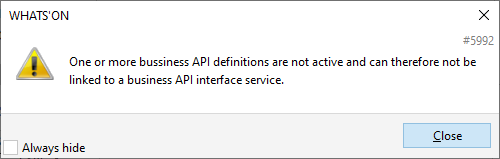
When the user tries to add an API that is not active, message 5992 is shown.
2023r10
Fix for incorrectly parsed login call in BAPIs
Login calls are used to authenticate a user when sending calls to the business APIs. They will contain the username and password of the user in the body. When the body is entered incorrectly but in JSON format and sent, for example:
{dsdqs
  "username": "user",
  "password": "won"
}
then the following error response would sent:
{
    "statusCode": "400",
    "message": "The specified JSON is not syntactically valid",
    "timestamp": "2023-10-04T13:37:43Z",
    "errors": [
        {
            "errorCode": "REST-400",
            "description": "The specified JSON is not syntactically valid",
            "data": []
        }
    ]
}
However, when you would enter a body not in JSON format, for example,
--"username": "user",
--"password": "won"
then the BAPI service would crash and the credentials were visible in the crash report.
This issue has been fixed. From now, in this case, the same error message is returned:
{
    "statusCode": "400",
    "message": "The specified JSON is not syntactically valid",
    "timestamp": "2023-10-04T13:45:11Z",
    "errors": [
        {
            "errorCode": "REST-400",
            "description": "The specified JSON is not syntactically valid",
            "data": []
        }
    ]
}
2023r8
Fix for content-type header of login call from REST services
It is possible to authenticate calls from REST services to external systems using JWT.
Previously, when a login call was sent from a REST service in WHATS'ON (for example when pushing change log entries), the Content-type header was set to application/plaintext while the format of the body was in JSON.
This issue has been fixed. The Content-type header is now set to application/json.
Fix for error response code for expired JWT
In a previous version, authentication using JWT was implemented using the JWT standard.
Previously, when the JWT was expired, error response code 403 was returned.
{
    "statusCode": "403",
    "message": "The account being accessed does not have sufficient permissions to execute this operation. [Additional info]",
    "timestamp": "2022-08-19T12:27:48Z"
}
However, according to the standard, error code 401 should be returned.
{
    "statusCode": "401",
    "message": "The access token expired",
    "timestamp": "2022-08-19T12:27:48Z"
}
This issue has been fixed. When the token is expired, a 401 error will be returned.
2022r12
Setting for unique external references per concept
Previously, the external reference of objects in WHATS'ON was a string field without a uniqueness constraint. However, this field is used as a unique identifier in BAPIs and other integrations, which can cause errors.
From this version, it is possible to configure whether external references should be unique per concept. This means that a product and a media asset with the same external reference are still allowed.
When this hard-coded setting is enabled, and there are duplicate external references on the same concept, a problem will appear that prevents saving.
Please contact MEDIAGENIX to enable this setting for you.
2022r8
Fix for error messages for incorrect values in BAPI
Previously, when defining an incorrect value for attributes in the BAPI that consisted of integers (for example, sequence numbers) or digits and periods (for example, cost fields), the error response contained the following description:
Value of [field] should be a string
Since this was misleading for the content of the attributes, the following errors are now returned:
-
Integers:
Value of [field] should be an integer
-
Digits and periods:
Value of [field] should be a number
2022r7
Standard JWT tokens for REST API services
It was already possible to authenticate users for a REST API using JWT. Previously, however, the implementation in WHATS'ON did not completely follow the JWT standard.
From this version, the tokens are generated according to the standard.
The JWTs are still used by setting the Authentication method on a service to User-based JWT, which now triggers the new implementation. When the correct credentials of the API user are sent using the login call of the API, the access token is returned in the response.
{
    "statusCode": "200",
    "message": "Authentication successful",
    "token": "0123456",
    "service": "BAPI"
}
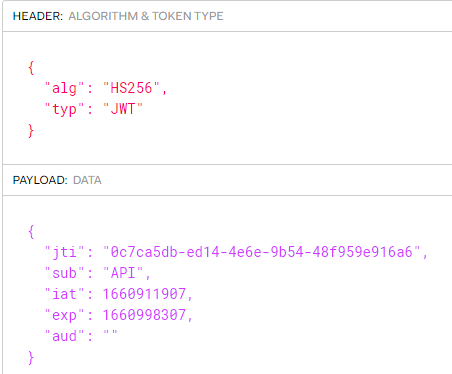
When this token is decoded, it now contains the following header and claims:
-
alg or algorithm: the algorithm used to sign or encrypt the JWT. For WHATS'ON, this is always HS256.
-
typ or type: the type of the token, which should always be JWT.
-
jti or JWT ID: a generated UUID used for identification. It can be used to find the token in the issued tokens list. (RN-5008)
-
sub or subject: the name of the user for which the token was issued
-
iat or issued at: the timestamp of when the token was issued in INTDATE format.
-
exp or expiration time: the timestamp of when the token will expire in INTDATE format. This is determined by the Access token validity period (seconds) property on the service or when issuing the token (RN-5008).
-
aud or audience: the user code of the Allowed API endpoints on the user account for which the token was issued.
When the token is combined with the JWT secret of WHATS'ON, it is possible to verify the signature.
When the JWT is not accepted, a 403 response is returned:
{
    "statusCode": "403",
    "message": "The account being accessed does not have sufficient permissions
               to execute this operation. [Additional info]",
    "timestamp": "2022-08-19T12:27:48Z"
}
The additional info in the response indicates the cause:
-
Invalid header: a different alg from HS256 or typ from JWT.
-
Invalid signature:
-
Expired token: when the token has expired.
-
Revoked token: when the token has been revoked (RN-5008)
Note that existing tokens will not work anymore after the upgrade as the verification now expects the JWT standard.
Issued tokens on user account
WHATS'ON now keeps track of the issued tokens for a user in the Issued tokens tab on the user account. Note that not the actual token is not stored on the database. Tokens can also be revoked from this tab. See RN-5008 for more information.
API endpoint on REST services and user accounts
WHATS'ON REST APIs can be protected from unauthorized access by enabling authentication on the service settings. When used, access to API resources require a bearer access token header, as part of each request. This token is obtained by authenticating to a logon endpoint, using a user and password of a WHATS'ON password with access type API or UI and API. (RN-1917)
Up until now, an API user could be used to access any WHATS'ON REST API.
In order to provide better control of which user can access which services, an additional level of API permissions has been added.
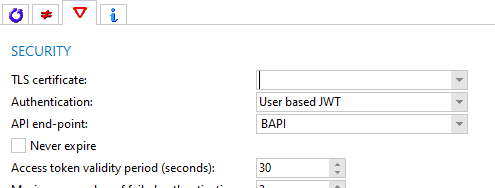
On the service configuration, the drop-down API endpoint is available where it can be used to specify the endpoint needed for this service. It is only enabled when the Authentication is set to User-based JWT.
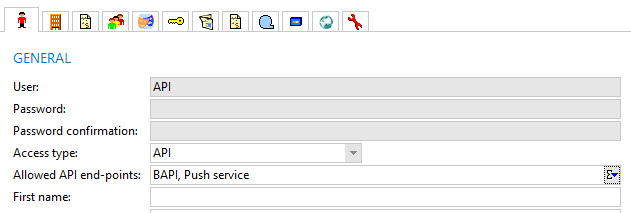
On the user account, the drop-down Allowed API endpoints is available, where it can be used to specify which endpoints the user has access to. It is only enabled when the Access type is set to API or UI and API.
The field takes its values from the new drop-down list MgXAPIEndPoint. The user code for each value is mandatory since it will be used for authentication.
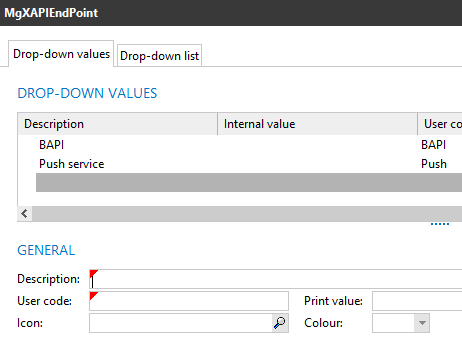
When a user authenticates to a REST API service by sending a login call, the token is returned. When it is decoded, the aud claim will contain the user codes of the API endpoints of the user. In my example, the user has the endpoints BAPI and Push defined.
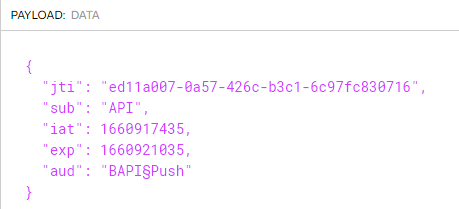
When the user sends a call with the token to the API, the API endpoints of the service and user are compared. If the service has no end points defined, those of the user do not need to be checked. If it does, it will be checked if the API endpoint of the service matches any of the endpoints on the user account. If not, a 403 response is returned:
{
  "statusCode": "403",
  "message": "The account being accessed does not have sufficient permissions to execute this operation.
              User not allowed for this API endpoint.",
  "timestamp": "2022-08-19T13:50:49Z"
}
If user has the endpoint, the call is handled and executed.
Fix for response for invalid tokens sent to BAPI
Previously, when using authentication on the BAPI service and a token was sent that was changed manually, for example by adding text to it, the service would crash.
This issue has been fixed. When an invalid token is sent, the following 401 response is returned:
{
    "statusCode": "401",
    "message": "Server failed to authenticate the request.
               Make sure the value of the Authorization header is formed correctly including the signature.",
    "timestamp": "2022-11-14T14:42:21Z"
}
2022r4
Applications part of business API module
Previously, certain applications that are needed for using the business APIs were not part of the business API module. This meant that when the module was not active, it was still possible to access them.
From this version, the following applications can only be used when the business API module is active:
-
Business API browser
-
File API log entry browser
-
the Business API interface and the File BAPI interface service types when creating a new service
Fix for BAPI service receiving tokens
When using the business API service to send calls to WHATS'ON, it is possible to authenticate using a user-based JWT.
Previously, when a token was sent with a POST /login call to the service, for example via Postman, the system crashed. This was because of a bug in the token parser.
This issue has been fixed.
2021r1.001
Previously, the messages returned by the REST interfaces (configurable REST with REST API definitions or the BAPIs) had a different format depending on the type of error.
From this version, the format of the different messages has been made consistent per status code across XML and JSON REST responses.
2021r1.000
Maximum number of failed authentications for REST services
Previously, when logging into a REST service but the credentials could not be validated several times, it was not possible to configure notifications for this. However, invalid logins could be a sign that someone is trying to hack their way into the system and pose a security risk.
Therefore, in this version, a new property has been added to the REST services called Maximum number of failed authentications.
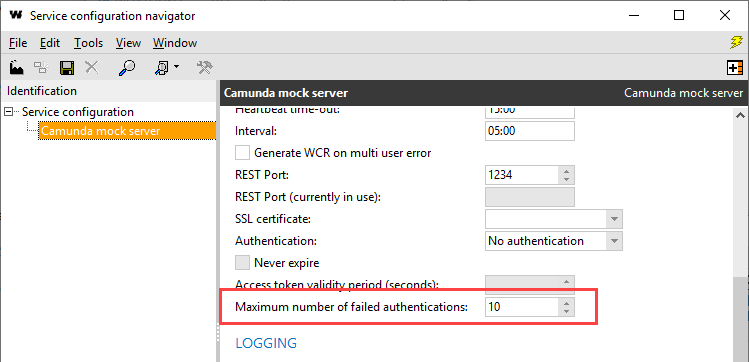
When a user of access type API fails to log in more than the number of times set in this field, and email notifications are configured, an email will be sent to the email addressee to notify that maximum authentication tries was exceeded.

The log of the service will then include a reference to the user and the IP address from which the logging in was attempted. This allows security officers to block this IP in the firewall.
